

Restaurants, salons and local shops
Google My Business photo guidelines, and the photos worth adding first
When someone nearby searches for a haircut, a lunch spot or a locksmith, the first thing they often see is your Business Profile on Google Search or Maps, and the photos are what they swipe through before deciding to call, ask for directions or move on. Google’s own help page describes business photos as showing the features customers use when deciding to buy. The Google My Business photo guidelines (Google now calls the product a Business Profile, though plenty of owners still search for the old name) fit on one screen. Getting the right photos up and keeping them current is the part that needs a plan.
Turn a real photo of your shop into a short promo for Reels and TikTok. You see the plan and the price before anything is generated.
This guide is that plan. The rule-by-rule table, with Google’s wording and a source for every line, lives on our Google Business Profile photo requirements page. Here you get a short version of the rules, the photos to add first for a restaurant, salon, shop or service business, a routine for keeping the profile fresh without hiring a photographer, and a clear line between what goes on the profile and what belongs on your social accounts.
Blurbly editorial · · 9 min read
Google Business Profile photo requirements in one minute
Photos go up as JPG or PNG files between 10 KB and 5 MB. Google recommends 720 × 720 px and lists 250 × 250 px as the minimum. That is the whole answer to the GMB photo size question: the help pages set no required aspect ratio, so a square crop and an ordinary landscape phone shot both work. Videos can run up to 30 seconds and 75 MB, at 720p or higher.
The line that decides more than any number is about quality. Google’s photo tips ask for pictures that are in focus and well lit, with “no significant alterations or excessive use of filters or AI”, and sum it up in five words: the image should represent reality. Nothing shows to customers until the profile is verified, and every upload is reviewed. New media can sit as Pending for up to 24 to 48 hours before it goes Live, or come back Not approved if it breaks a policy.
The file is usually the obstacle, not the picture. Originals from a recent phone are often heavier than 5 MB. The free product image resizer has a Google Business Profile preset that exports a 1,200 × 1,200 px copy in your browser, padding or cropping without touching what is in the frame, and nothing gets uploaded to us.
What gets a photo turned down or taken off later
Google’s tips for posting media to Maps list what to avoid: screenshots, stock photos, GIFs, collages, heavily edited or manipulated photos, and imagery created by other parties. They also ask you not to add borders or text, and say any promotional overlay should be relevant to the place. Low-quality media can be removed, and Google states that quality removals can’t be appealed, so a blurry upload is not harmless filler.
The easiest rejection to avoid is a good photo with something added to it: a “20% off this week” banner, a phone number along the bottom, a logo stamped in the corner. Upload the clean photo, put the logo in the logo slot, and carry the offer in a post, which we come back to below.
Two policy lines catch restaurants, bars and salons in particular. For regulated products such as alcohol and tobacco, Google’s restricted content rules say uploads shouldn’t show deals, coupons or prices, while incidental depictions like a menu or a drink in the background are excluded. A cocktail photo with “2 for 1 until 7pm” printed across it is a problem; the bottles behind the bar in a dining room shot are not. The personal information rules count a person’s face in a photo posted without their consent, so ask staff and clients before their faces go on the profile.
The first photos to add, business by business
Google suggests at least three photos in each category that fits you: exterior, interior, products, at work, food and drink, and team. Treat that as your first upload. Exterior shots do the most practical work, because the person looking is often trying to find your door. Shoot the entrance from each direction people arrive. Google also suggests different times of day, which matters if your frontage looks different after dark.
For a restaurant or café, the order after the exterior is the room seen from a customer’s seat, your three best sellers, a drink or two, the counter or pass while service is running, and the team. Plate dishes the way they leave the kitchen on a normal weekday, real portion included. The same session can feed your delivery menus, which have their own framing rules (see the DoorDash menu photo requirements), and your social promos; the restaurant page shows how one dish photo becomes a short vertical ad.
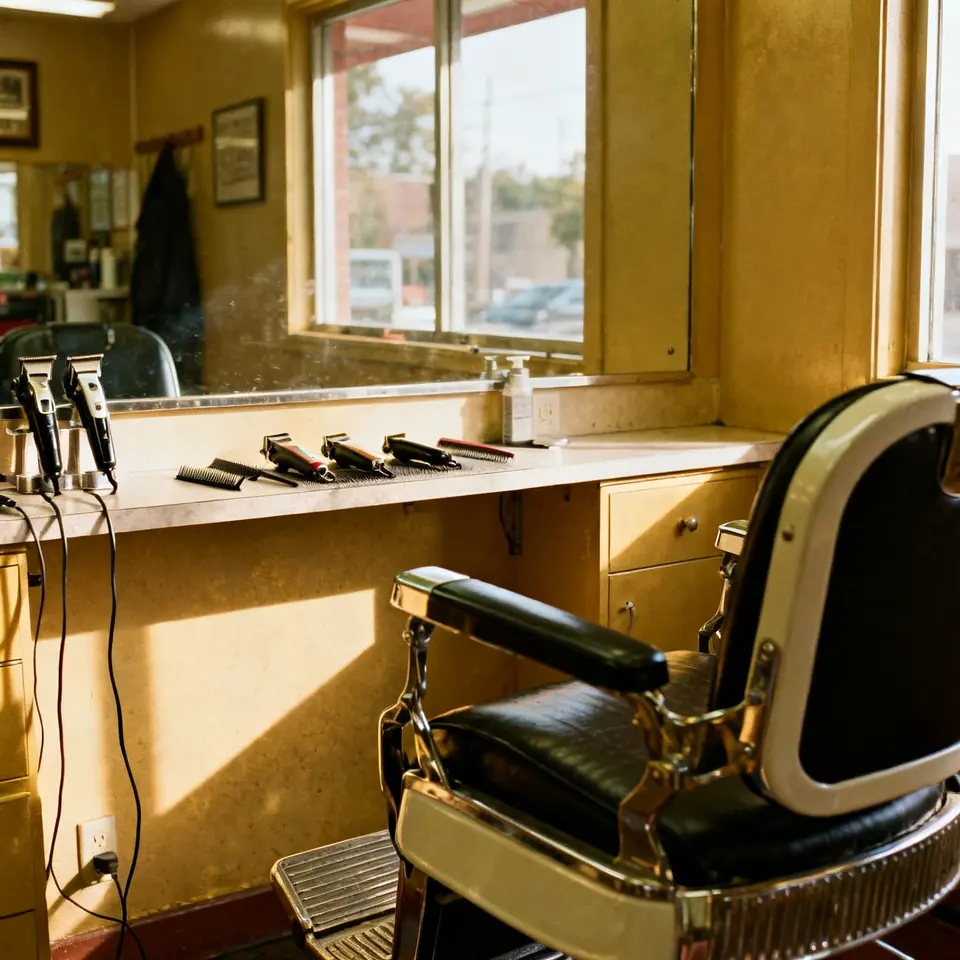
For a salon or barbershop, the room and the stations come first, then work in progress: a fade halfway done, colour going on, a gel set under the lamp. Finished work matters most to a new client, and it has to be your work on real clients who agreed to be photographed. The salon and barbershop page explains why your portfolio and your promos should live apart.
A shop needs the view from the entrance, the shelves your regulars head for, and close-ups of best sellers in even light. A service business without a storefront leans on the at-work category instead. Say you run a two-person handyman business: ten honest photos of fitted shelves, patched walls and your van outside a job (with the owner’s permission) tell a stranger more than a logo ever will. A first upload for most businesses looks like this:
- Three exterior photos: the entrance from each approach, one at a different time of day
- Three interior photos taken from where a customer would stand or sit
- Three photos of your best sellers, signature dishes or finished work
- Three photos of the team at work, with everyone’s agreement
- One video under 30 seconds: a single steady shot of the place in use
- Your logo in the logo slot, and a cover photo you would be glad to see first
One shoot for the profile, the menu apps and your feed
Few owners have time for three separate shoots, so plan one session that serves every place your photos go. Pick a quiet hour with daylight, wipe the lens, switch off portrait blur and any object-removal or beauty tools, and shoot each subject twice: once horizontal for the profile and delivery apps, once vertical for Reels, TikTok and Stories.
Then sort by destination. The untouched originals, straightened or brightened if needed, go on the Business Profile. Cropped copies go to delivery menus. The best vertical dish or room photo becomes the starting frame for a promo: on Blurbly you upload that photo, write the offer, and see the shot plan and the price before anything is generated. The finished clip is for your social channels and ads, never the Photos tab.
Keep the originals in one album with the date in its name. When a dish changes or the room gets repainted, you will know at a glance which photos on the profile have gone out of date.
Keeping Google Business Profile photos current
Your newest uploads appear first on the profile, and you are not the only one uploading. Customers can post photo updates from the Google Maps app, and Google says you can’t stop them; you can reply, and report the ones that break policy. If your chosen cover photo is low quality, or other sources suggest it isn’t the best image of the business, Google may show a user-submitted photo in its place. A steady supply of good owner photos is the simplest way to influence what people see first.
Google doesn’t publish a schedule, so here is ours. Add a few new photos every month, plus a batch whenever something visible changes: a new menu, a renovation, new signage, a new service. Delete photos that now mislead, such as an old price board, a dish you dropped, or a former staff member who asked to be taken down. Reshoot the exterior when the season changes the street, because a snowy February photo does little for someone looking for your door in July.
Offers belong in posts, not on photos. An Offer post needs a title, dates and times, adds a View Offer button, and can carry a photo, a video, a coupon code and terms; use a real photo of the dish or the shop there too. Posts older than six months are archived unless they have a date range, and you can schedule a post or set it to repeat weekly, which suits a standing lunch deal. Keep phone numbers out of the post text, since Google may remove posts with contact details it can’t verify; the Call now button uses your verified number instead.
Why AI-generated and stock images stay off the profile
Google’s wording leaves little room. The photo guidelines ask for images without significant alterations or excessive use of filters or AI. The Maps media tips ask for media you captured with a camera at the location and name stock photos and imagery created by other parties as things to avoid. The Maps fake engagement policy covers content that doesn’t accurately represent the location or product, and the tips for Business Profile posts warn against auto-generated content.
There is a business reason under the policy as well. A profile photo is a promise about what someone will find when they walk in. If a generated dining room is bigger, brighter and emptier than yours, the first thing a new customer notices on arrival is the gap, and some will mention it in a review. A plain, accurate photo of a busy Friday sets an expectation you can actually meet.
AI earns its place one step away from the profile. A real photo of your storefront, chair or best dish can become a short vertical promo for Instagram, TikTok and Facebook, which is what our industry pages and the 30-day local video plan are about. The profile can point to those accounts: in supported regions you can add one social link per platform, including Instagram, TikTok, Facebook and YouTube. For single-location food and drink businesses in the US, UK, Canada, Australia and New Zealand (in English, for now), Google may also show posts about events, deals or specials from your Facebook and Instagram on the mobile profile, so keep those promos accurate about the food and the price.
How to tell whether the photos are doing their job
Once the profile is verified, the Performance report shows views, the search terms people used to find you, calls from the profile, direction requests, website clicks and, if you have a menu, how often people opened it, menu photos included. Open it from your profile on Google Search, or in the Google Maps app under Business, and set a date range. On Search, each photo also shows its source and total views in the bottom left corner, which tells you whether people are looking at your shots or at customer uploads.
Keep the test simple. Write down the date of each photo refresh, then compare calls and direction requests for the four weeks after it with the four weeks before. Direction requests are the closest thing to a footfall count the report offers. Two cautions apply: the report mixes organic results with Google Ads, so discount any period where you changed ad spend, and seasons and holidays move these numbers too, so compare like with like where you can.
Photo views help you decide what to replace. When one of your photos has far fewer views than its neighbours after a month, swap it for a sharper or more useful shot of the same thing, and leave the ones people keep opening where they are.