

Lingerie brands
What a lingerie website and its ads can show, and how to grow inside the rules
Someone searching for an “uncensored lingerie website” might just be curious. Often, though, it’s a person who sells lingerie and wants to know how far their own site, ads and product photos can go. This is written for them. A lingerie website is a clothing store with an unusually long line of reviewers: the ad platforms, Google’s Shopping policies, the store platform and, behind the checkout, the payment processor.
Make catalog-style lingerie product photos. You see the plan and the price before anything is generated.
The short answer is that a lingerie online store can show its products clearly, on adult models, across a real size range. It can’t show nudity or sexual content, and an explicit or “uncensored” site is a different business, one that mainstream payment processors and ad platforms restrict. Below is what each gatekeeper’s own policy says, then how lingerie brands grow without testing those lines: catalog-style imagery, an honest size range, real fit detail, and an email list you own.
Blurbly editorial · · 8 min read
Lingerie is clothing until the imagery says otherwise
None of the policies below ban lingerie as a product. Meta’s health and wellness ad standards list lingerie, swimwear and undergarments among the ad types exempt from its age-targeting requirements, as long as the ad doesn’t violate the Adult Nudity and Sexual Activity policy. Google’s Merchant Center policy on sexual content restricts nudity, sexual merchandise and sexual entertainment, and the only lingerie it names is “sexual fetish lingerie”, listed as merchandise next to sex toys and sexual enhancers.
So the line runs through what your pictures, videos and copy show, not through the word lingerie. A cotton bralette in a flat-lay is apparel. The same bralette on a page with nudity, or in a gallery sold as “uncensored”, moves that page, and possibly the store, into a category every gatekeeper treats differently. That single choice affects payments, ads, Shopping and your platform at once, which is why it’s worth making deliberately.
What payment processors and Shopify restrict
Start at the checkout, because losing payments ends a store faster than a rejected ad. Stripe’s Prohibited and Restricted Businesses page, updated 22 September 2026, lists pornography and other mature audience content designed for the purpose of sexual gratification as prohibited, along with any AI-generated content that meets the same criteria. Shopify Payments lists adult products, meaning products or services that contain sexually explicit content such as adult videos, pay-per-view adult content or adult magazines, as prohibited, and says its list isn’t exhaustive and varies by region. PayPal’s Acceptable Use Policy rules out transactions involving items considered obscene and certain sexually oriented materials or services.
Shopify’s Acceptable Use Policy is written as principles rather than a list. It points out that Shopify Payments involves an ecosystem of processors, card networks and banks, and that if you use those services you need to respect the terms they ask of you. The Shop channel adds its own list, which prohibits mature and adult content or services and products that have nudity.
Everyday lingerie appears in none of these lists. Explicit content appears in all of them. That is the practical meaning of “uncensored”: a site built on explicit imagery can’t run on the standard setup a lingerie brand relies on, and it is a separate business from selling bras and briefs. Blurbly doesn’t make that kind of content either.
What lingerie ads can show on Meta and TikTok
Meta’s ad standards on adult nudity and sexual activity say ads must not contain nudity, including near-nudity covered only by a digital overlay, or sexual activity. They also list content for which ads should target users above the age of 18, including photorealistic imagery of people in sexually suggestive poses, revealing clothing or stripping, and imagery focused on individual body parts such as the groin, buttocks or female breasts. Whether a given lingerie photo reads as revealing clothing is Meta’s call, not yours, and a neutral catalog shot keeps you out of that argument.
TikTok’s adult content policy is blunter. It lists swimsuits, lingerie or clothing that exposes or implies exposure of intimate areas as sexually suggestive and not allowed, together with emphasis on sensitive body parts, sexualized body positions, flirtatious movements, stripping or undressing, and sexually suggestive text or audio. Displaying nudity counts as sexually explicit. If you also sell through TikTok Shop, its Product Listing Policy prohibits explicit or suggestive sexual imagery in product images and videos. The lingerie ad policy guide turns TikTok’s list into notes for the shoot and the edit.
In practice this sorts your image library into two piles. The ad pile is flat-lays, hanger shots and full-length catalog images on adult models in relaxed, neutral poses. Anything you hesitate over stays out of ads, and anything that couldn’t pass the processor and Shopping rules above doesn’t belong on the site either. Build each campaign for the strictest feed you plan to buy, rather than making one version per platform and hoping.
Google Shopping and the adult flag
Google Merchant Center has a product attribute called adult for products that are for adults only, and it is required when a product contains adult content such as nudity. If your website is generally focused on an adult audience, Google points you to an account-level setting instead. And it adds a condition that catches mixed stores: if you advertise products that aren’t adult-oriented, their landing pages must be free of adult-oriented content.
Restricted sexual content, per the policy, shows only in limited scenarios based on user search queries, user age and local laws, and listings must not target minors. For a lingerie brand, the plain reading is that the products you send to Shopping, and the pages they land on, should look like the intimates section of a department store. If you also sell fetish pieces, check them against the sexual content policy on their own, since that is the one kind of lingerie Google names as restricted merchandise.
Lingerie product photos that sell inside the rules
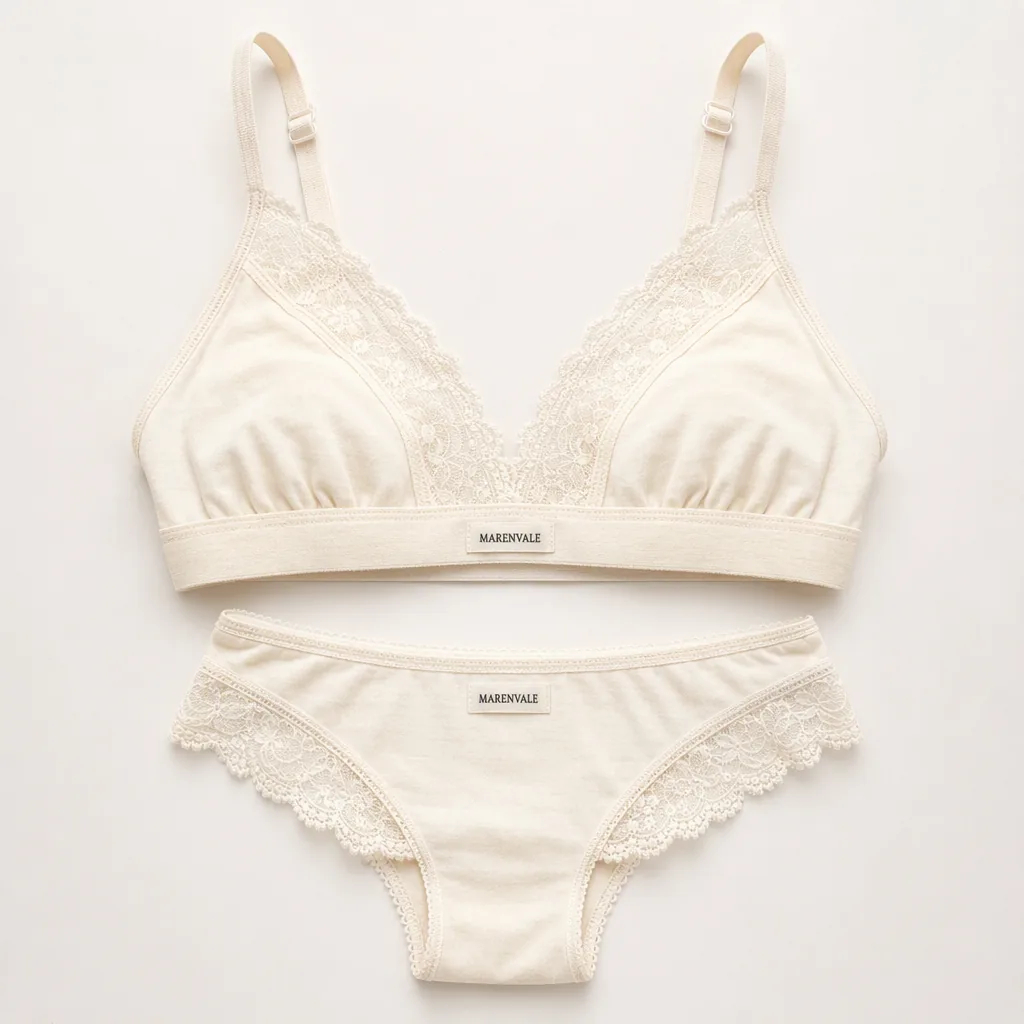
The images least likely to trouble any reviewer above are also the ones that answer a shopper’s questions: what the lace looks like, where the straps attach, how deep the band is, what colour the fabric really is. Start each product with a flat-lay and a white-background image. They carry the detail, they suit the site, Shopping and ads alike, and in Blurbly’s own lingerie tests they generated without the declines that on-model shots ran into. Then add full-length shots on adult models, standing, in soft even light. Layering, such as the set worn under an open cardigan, gives you a lifestyle image that still reads as a product photo.
Leave out whatever pushes an image toward suggestive: crops that frame the chest or hips, bedroom posing, a strap sliding off a shoulder, captions written as innuendo. None of it tells a buyer whether the cup shape suits them. Sheer and open-design pieces are better shown on a hanger or flat, where the fabric reads as fabric.
If you make these with AI, the brief matters more than the tool. Blurbly makes flat-lays, white-background images and catalog-style shots on adult models from a photo of your product, and it doesn’t make nude or sexualised images. Some image models decline lingerie inputs outright: in Blurbly’s test, Nano Banana Pro and Nano Banana 2 declined a plain lingerie packshot, while Seedream 4.5 produced the catalog shots. Compare every result with the real garment, because one of those shots added a bow and a keyhole the real bralette doesn’t have. The AI lingerie model photos page shows the briefs, the lingerie product photography page covers flat-lays and colourways, and the no-filter product photo guide explains why on-model requests get declined.
Show the size range honestly
People buying intimates want to see a piece on a body like theirs, and one model in one size can’t show that. Put the same set on several body types, in the same pose, light and backdrop, so the comparison is about fit rather than styling. Keep proportions believable. An image that slims a waist or reshapes a bust misrepresents the garment as much as the body, and the customer who receives it will notice.
Be careful with the line under an AI model. “Model wears size M” describes a real fitting, and a generated image didn’t involve one. Put fit information where it is true: the size chart, measured garment dimensions, how the band runs, whether cups are lined or padded, how much the fabric stretches and how sheer it is in daylight. The fit questions customers email you are the best source for that copy. If an on-model image is generated, saying so on the product page is the honest default.
Growth that doesn’t depend on ad approval
Ads are reach rented under someone else’s rules, and in this category those rules are reviewed creative by creative. The channels you own carry far less of that risk: your email list, your product pages and the search traffic they earn, and customers who already know their size in your brand. Treat ads as the way new people find you and owned channels as the way they come back.
A few habits compound. Give every style its own fit notes, written from the questions buyers actually ask. Ask for reviews that mention size and fit, and use customer photos only from people who chose to share them. Send a short how-to-measure email with the first order, then restock and new-colour emails to people who already wear your sizes. Describe products like a spec sheet and write alt text that names the colour, fabric and style, which is what shoppers type when they look for lingerie product photos of a particular piece.
Swimwear sits under nearly the same Meta and TikTok rules, so if you sell both, one image system covers the two. The AI swimwear model photos page applies the same catalog approach to swimsuits.
A launch plan for one new set
Say you’re launching a cotton-modal bralette with a high-waist brief, in six sizes and two colours. This order keeps every channel open and puts the riskiest step, paid social, after the images have been checked twice.
- Week one: a flat-lay and a white-background image for each colour, then full-length catalog shots on two or three body types. Check lace, straps and colour against the real set.
- Week one: write the product page like a fitting-room conversation, with the size chart, garment measurements, stretch, lining and care.
- Week two: email your list first, with the flat-lay and a size-range image. Existing customers already know how your sizing runs.
- Week two: send the plain packshots to your Shopping feed, linked to pages that carry nothing you would hesitate to have reviewed.
- Week three: run Meta and TikTok ads from the catalog shots and a short product-only motion clip, with the garment in focus and sound checked for suggestive lyrics.
- Week four: collect fit questions and reviews, add the answers to the product page, and brief the next colour.