

Clothing brands and boutiques
AI fashion model generator: from a mannequin photo to a catalog still
An AI fashion model generator takes a photo of a garment and draws an adult wearing it. Searchers also call the same job mannequin to model, flat lay to model, or clothes on models. The input that decides the result is not the prompt. It is whether the photo already shows the seams, the length and the colour you have to match.
Put this garment on an AI model. You see the plan and the price before anything is generated.
This guide is for a clothing label or a small boutique that wants catalog stills without booking a studio this week. It uses one owned example, a fictional linen dress shot on a ghost mannequin, then says what to reject. It also reads Fotor’s public fashion-model and flat-lay pages, checked on 27 October 2026, so the comparison is about what those pages claim, not a same-photo test. We did not run Fotor.
Blurbly editorial · · 9 min read
What the generator is being asked to invent
A product photo already contains the garment. The generator’s job is to supply a body, a pose, light and a place, then drape that garment over the body. Those are four inventions, and only the garment is yours. If the source hides a hem, a lining or the back, the picture will guess. A guess can look tidy and still be the wrong product.
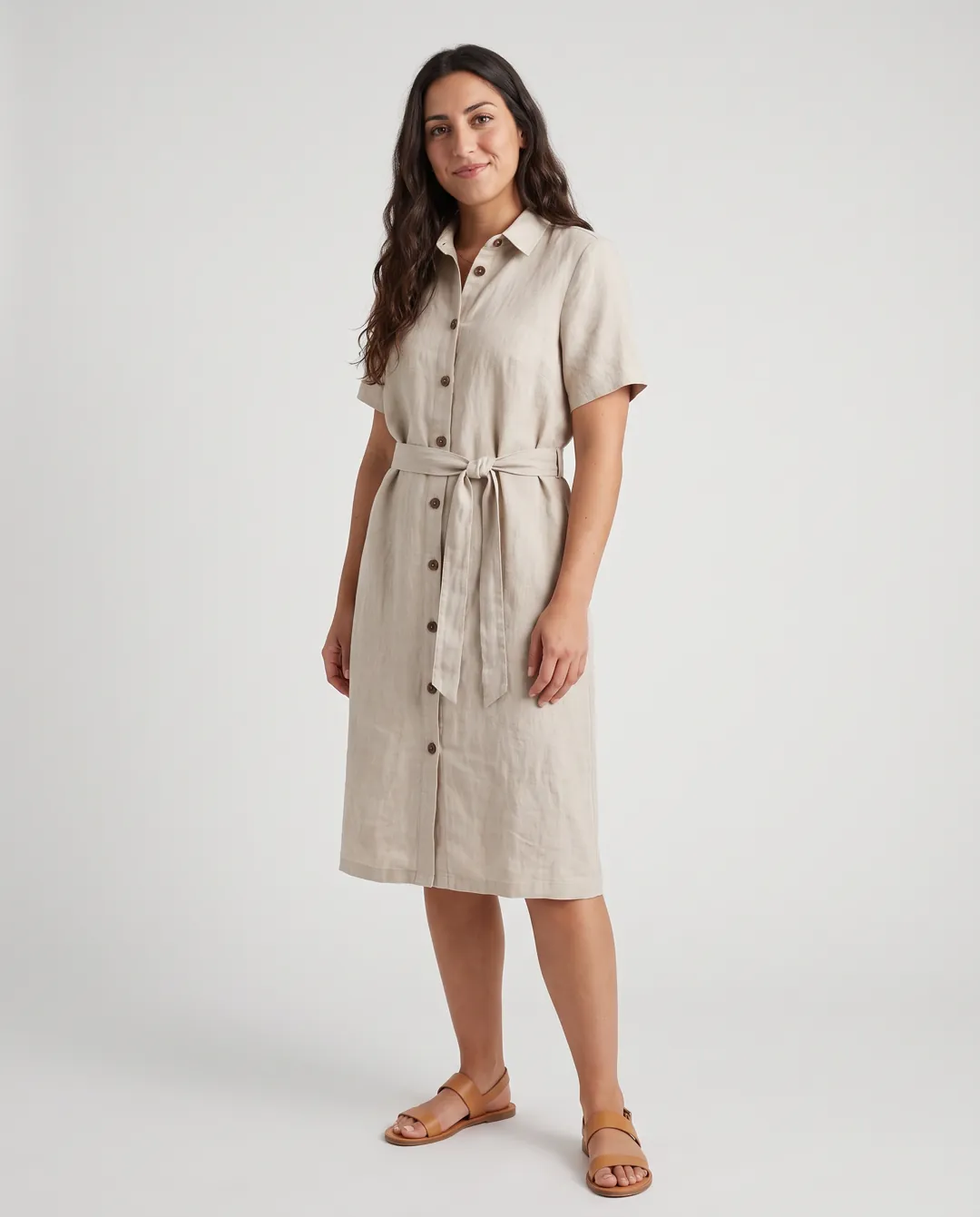
That is why “AI fashion model”, “AI clothing model” and “mannequin to model AI” are the same workflow with different starting files. A ghost-mannequin shot already holds the shape. A flat lay holds the print and the hardware, and almost none of the drape. A dress form in a shop holds both, plus the room behind it, which the model may keep or replace. Name the file you have before you write the prompt. The mannequin to model page shows the three files side by side: a ghost-mannequin dress, a flat-lay jacket and a knit set on a dress form.
People also search for an AI fashion models generator when they want the same SKU on more than one person. That is a second pass, not a different product. Keep the garment photo fixed, change only the model reference, and compare every output to the garment, not to the previous model. Five faces do not prove five correct fits.
Pick the source photo before you pick the model
Start with the file a factory or a photographer would accept as the record of the garment. Full piece in frame, even light, no crop through a cuff or a hem, no heavy beauty filter. If you only have a cropped Instagram shot of a sleeve, you do not have a catalog source. Shoot the garment again. A phone on a table, garment smoothed, window light from the side, is enough for a first pass.
Ghost mannequin and invisible mannequin files are the easiest. The torso shape is already in the cloth, so the generator has less to invent about volume. Still check the placket, the belt and the sleeve head. Those are the places a redraw likes to simplify.
A flat lay is honest about print, pockets and buttons, and silent about how the cloth hangs. Write the length you expect in the prompt, then treat the result as a proposal. If the dress in the photo ends above the knee and the still ends at the ankle, you have a different product. Do not “fix” that by cropping. Fix the brief or reject the file.
A dress form in the shop is useful because it is a real garment on a real stand. It also drags the boutique into the frame. If you want a plain catalog backdrop, say so. If you want the shop, say which wall stays. Leaving it unspecified is how a mirror, a price tag or a second garment sneaks into the still.
Fotor’s fashion-model page, read on 27 October 2026, tells visitors to upload a clothing image that is a flat lay, a mannequin shot or a studio shot, then generate a model and export for Shopify, Amazon and social ads. Their separate flat-lay page says the same idea covers clothes, pants, shoes, accessories and watches, and that you can upload your own model photo so a catalog can share one face. Those are their published steps. They are not a measured quality claim, and they are not a price.
The checks that matter more than the pose
Put the source and the still next to each other at the same zoom. You are looking for construction, not for whether the person is attractive. A handsome file with a moved pocket is a wrong file.
Use a short list and do not skip a line because the overall picture “looks fine”:
- Colour and wash against the source, including shaded folds that the generator may have darkened
- Seams, darts, cuffs, hems and closures, counted rather than glanced at
- Print scale and stripe alignment, especially where the cloth bends at a waist or an elbow
- Hardware: buttons, zips, buckles, and any small label that became readable text it should not be
- Length and volume. A flat lay does not prove a hem. Do not publish an inferred length as a measurement
- Extra garments the prompt did not ask for, such as a tee, shoes or jewellery that change the product story
- Hands, ears and glasses if a model reference included them. A catalog still does not need a perfect face, but a melted hand is a reject
One garment, several models, still one product
The useful version of an AI fashion model generator is a range, not a single hero. The same fictional linen dress on this site was rendered on five AI adults from the model library, with the garment photo held constant. That set is an internal example from 20 October 2026, made with Nano Banana Pro. It is not a customer result and not a promise that your file will match. The fashion model generator page keeps the source and the five stills so you can see what changed and what had to be checked: placket, belt, sleeves, hem, colour.
Change one variable at a time. First pass: one model, plain backdrop, full body, 4:5. If the garment survives the checklist, rerun with a second model reference and the same backdrop words. If you change the street, the time of day and the body in one prompt, you will not know which change broke the pocket.
A recurring face is a brand choice, not a technical requirement. Fotor’s flat-lay page advertises mapping a catalog onto one uploaded model. Blurbly’s library is a set of AI adults you can reuse across drops. Either way, the face is not evidence of fit. Your size chart stays the size chart. Do not answer a “does this run small?” email with an AI image.
Skin tone and body range are the reason to do the second and third passes. One model is a look. Two or three models tell more shoppers the garment exists in a world that includes them. They still do not sample your real size run. Say that on the product page if a shopper could reasonably think the picture is a fit model.
Fotor’s public page, and what this guide does not claim
Searches for “AI mannequin Fotor” are people comparing a known editor with a fashion-specific generator. Fotor’s page titles the tool an AI fashion model generator for e-commerce and describes three steps: upload the product photo, generate and fit models, export for listings and ads. The page also shows marketing figures, including a character-consistency percentage, a Capterra star rating and a commercial-use line. This guide does not repeat those figures as measurements. We did not reproduce them, and a vendor’s own page is not a shared test.
What you can compare without running either tool is the job shape. Both public descriptions accept a garment photo and return an on-model still aimed at Shopify, Amazon or an ad. Neither description, on the pages we read, says the output is a measured fit, a size-chart substitute, or a photo of a person who sat for you. If a page implies that, treat it as copy, not as a spec.
Price is the other comparison people want and the one a blog post goes stale on. Fotor’s pages we read did not state a per-image price in the sections above. Blurbly shows a plan and a quote in the studio before a paid render. Read the quote for the image you are about to make. Do not budget from an old screenshot, and do not treat a free preview as a finished catalog file.
If you already pay for Fotor and the stills you export survive the checklist, keep using it. This page is not a reason to switch. It is a reason to judge the garment, then pick the tool whose quote and review step you will actually use. The alternatives hub is where Blurbly’s other product comparisons live, with the date each one was checked.
Where the still can be published
A catalog still and an ad still are different crops of the same decision. For your own Shopify or boutique page, 4:5 or 3:4 full body on a plain ground is the file that has to be right. Lifestyle can come second, once the plain file matches. The clothing photo prompts page keeps tested wording for flat lays and ghost mannequins if you want the source itself to be cleaner before any model step.
Marketplaces care that the product in the picture is the product in the parcel. Amazon’s product image guide, the same page our main image guide cites, is about accurate colour, scale and quantity. When the picture also shows a photorealistic person who was entirely generated, that guide asks for the metadata keyword contains-synthetic-performer so a disclosure can be shown. A garment-only image does not need that keyword. A real contractor who sat for the photo does not need it either. An AI adult does.
Paid social is stricter about the body than about the file format. Swim and lingerie have their own lines, written on the swimwear model and lingerie model pages, and in the ad-policy notes those pages link. A dress or a jacket on an adult, clothes fully on, is an ordinary catalog problem. Do not reuse a closer crop from another category and call it the same shoot.
Motion is a separate job. A five-second walk made from an approved still can sit on Reels or a product page, and it can also invent button travel and hem swing that the still never had. Watch the clip before you post it. The catwalk video page is that second step, not a substitute for the checklist above.
When a generator is the wrong tool
Use a person with a release when the garment’s fit is the product claim. Tailoring, compression, maternity, adaptive clothing and anything sold with a measurement promise do not get to borrow an invented body. The AI still can be a range image beside the chart. It cannot be the chart.
Do not upload a photo of a customer, a stranger, or a hired model who has not agreed to AI use. The content policy bars deepfakes and minors. The library adults exist so a brand without a release can still make a still. If you have a release, say so in your own records. The generator will not ask to see it.
Stop after two failed checks on the same seam or the same colour. A third prompt that says “more accurate” usually redraws a different mistake. Reshoot the source, or send the SKU to a photographer. The point of the tool is to spend the studio day on the pieces that need a person, not to argue with a pocket for an afternoon.
If the piece is right and you now need a clip that can carry a product link, that is a different guide. Shoppable videos are the file plus the tag the platform adds. The still you just approved is only the starting frame.